
Export NetFlow from pfSense with softflowd
Your pfSense firewall will send NetFlow to anything that listens, and the totals that arrive can be wrong by a factor of ten.
On our own pfSense, a collector that counted only the obvious byte counter saw 8.8% of the traffic that crossed the WAN port. The same records, read properly, came to 98.4%. Nothing was broken. The firewall exported exactly what it was told to, and the missing traffic sat in a field that a lot of software skips.
The setup is one package and four settings, about five minutes. Getting the numbers right takes two more settings and one check.
Four settings get flows moving
pfSense Community Edition exports flows through a package called softflowd. Think of it as a clerk in the post room with a clipboard: it watches every packet that passes an interface, writes each conversation on a line, and posts the finished lines to your collector.
Install it from System > Package Manager, search for softflowd, and install. Then open Services > softflowd and set four things:
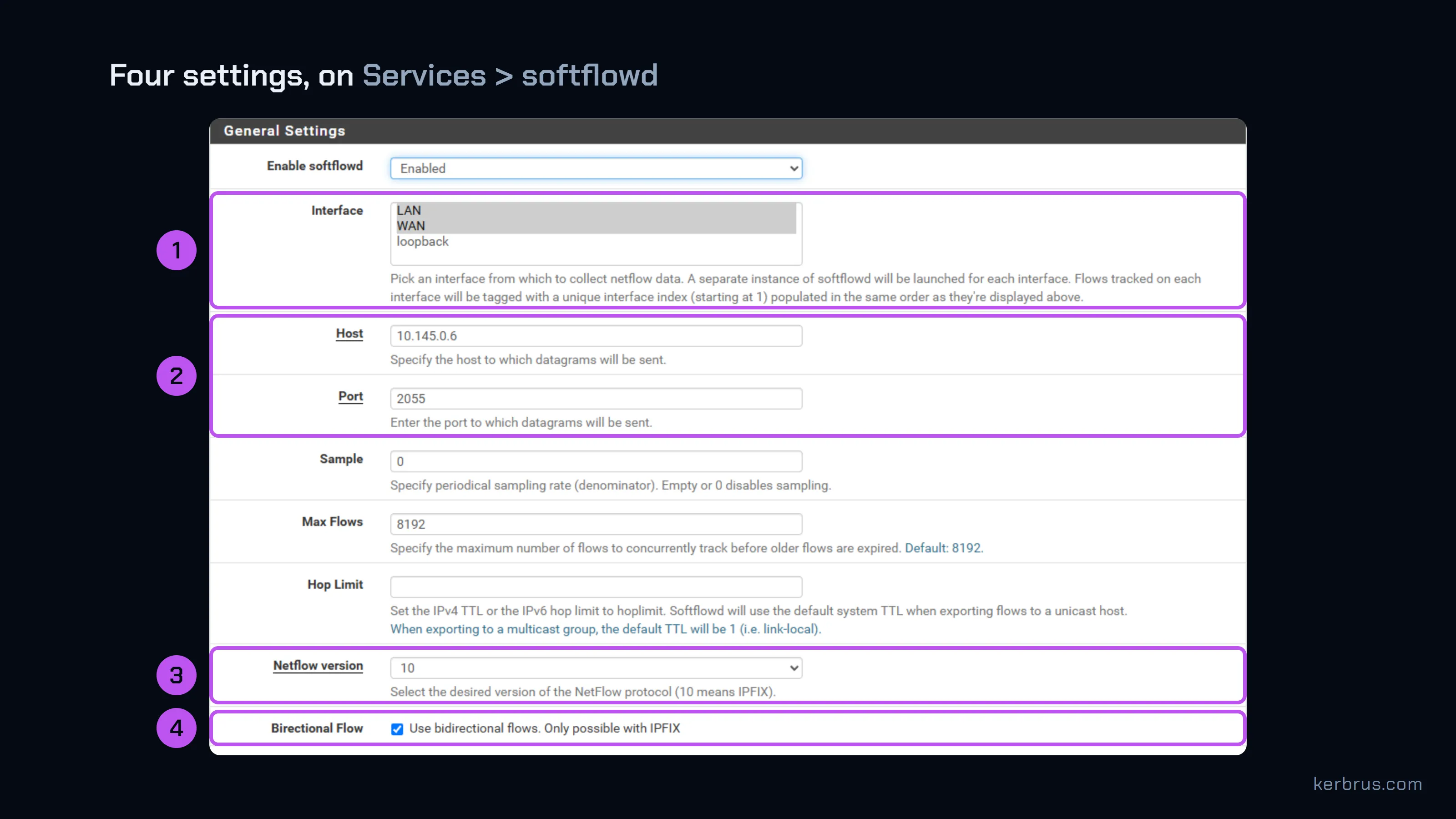
- Interface. Select every interface whose traffic you want to see. For most sites that is WAN and LAN.
- Host and Port. Your collector’s address and the UDP port it listens on. 2055 is the usual choice.
- Netflow version: 10. Version 10 is IPFIX, the standard that replaced NetFlow v9. It is also the only version that allows the next setting.
- Bidirectional Flow: on. One record per conversation instead of two. Section three is about what this changes.
Save, and softflowd starts exporting. Netgate’s softflowd guide describes the rest of the fields. If you run pfSense Plus 24.03 or later, there is also a built-in flow exporter that needs no package; the checks below apply to it too.
Each interface gets its own clerk
The settings page shows one form. The firewall runs one softflowd process for each interface you selected. On ours:
softflowd -i 1:em1 -n <collector>:2055 ... -b -v 10 ...   # LAN
softflowd -i 2:em0 -n <collector>:2055 ... -b -v 10 ...   # WAN
Two clerks, one return address. Both send from the firewall’s IP to the same collector port, each with its own templates and its own sequence numbers. They differ only by the UDP source port they send from, and softflowd picks a new one when it restarts.
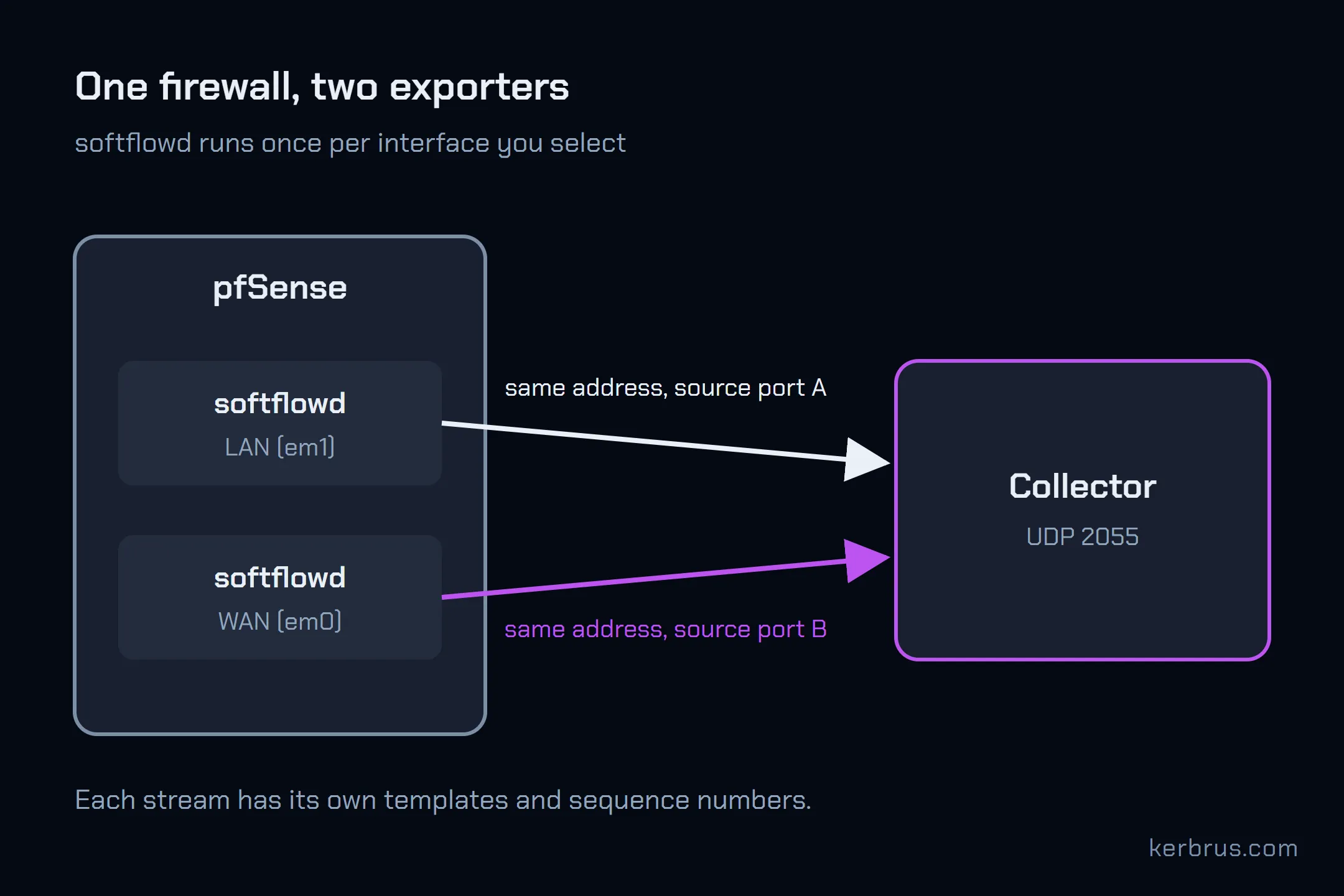
Which matters if your collector treats “one IP address” as “one exporter”. It mixes the two streams, and the result is templates that go missing and loss figures that never settle. Flow Collector keeps them apart by source port and carries the templates across a port change, so a softflowd restart does not cost you data.
Most of your WAN traffic rides the reverse counters
Bidirectional mode is where the factor of ten comes from.
A web page, a video or a software update is a small request going out and a large reply coming back. With bidirectional flows on, softflowd writes both halves on one line of the clipboard: the request in the forward counters, the reply in the reverse counters, defined in RFC 5103. A collector that reads only the forward counters sees the envelopes you posted and none of the parcels that came back.

We measured it. Over a 13-hour window we compared the flow totals for each port against the firewall’s own SNMP interface counters, which count every byte on the wire:
| Port | Forward counters only | Forward + reverse |
|---|---|---|
| WAN | 8.8% | 98.4% |
| LAN | 40.7% | 97.9% |
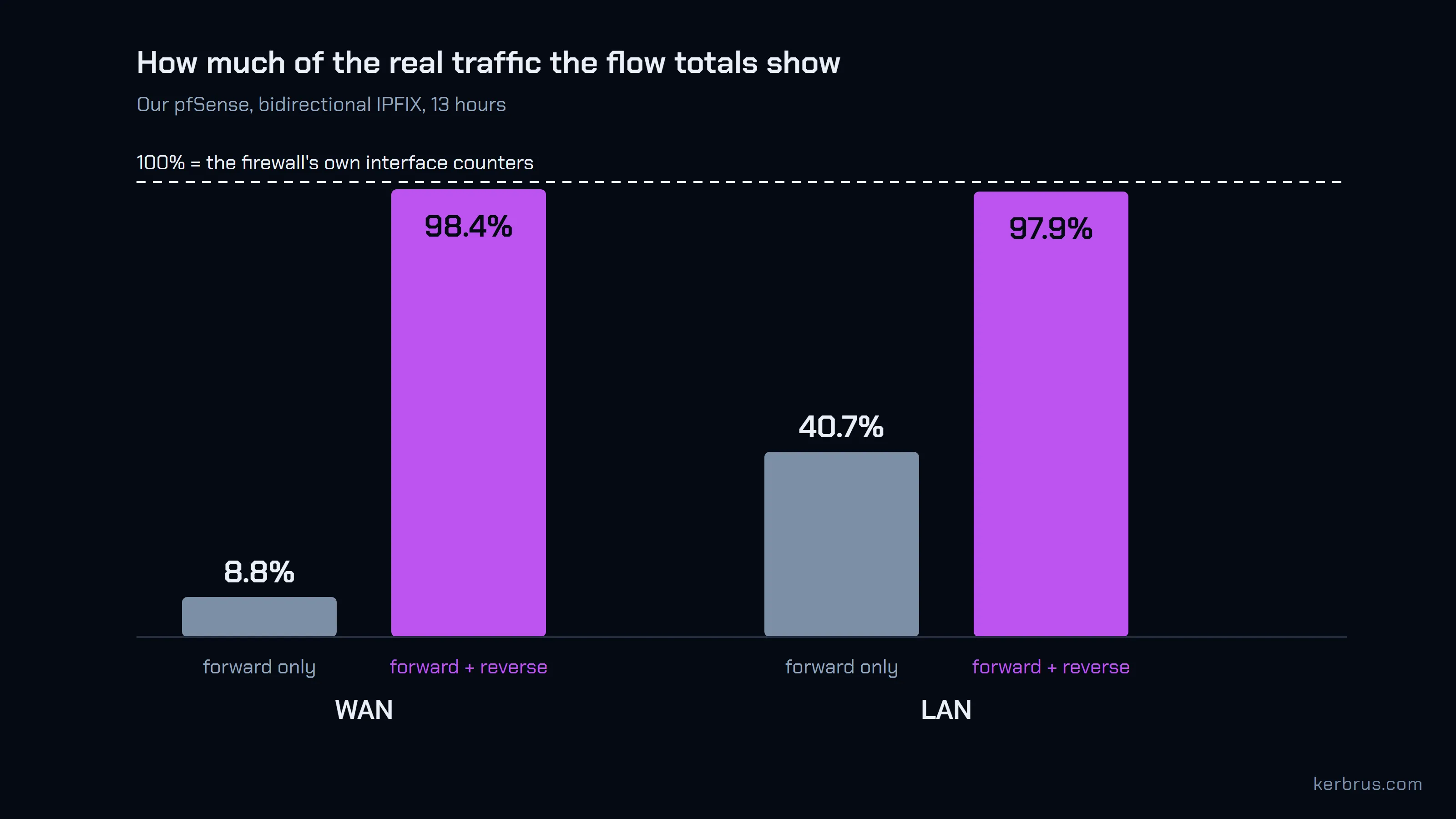
On the WAN, eleven twelfths of the traffic was reply traffic.
Don’t get us wrong: bidirectional mode is the right choice. It halves the number of records and keeps each conversation in one piece. But it moves most of your bytes into a field your collector has to know about. If it doesn’t, turn bidirectional off and accept twice the records. Or use a collector that reads both directions. Flow Collector counts both halves of every record in every total.
The default flow table is too small for a busy WAN
The clerk’s clipboard has a fixed number of lines. softflowd calls it Max Flows, and the default is 8,192. When the clipboard is full and a new conversation starts, the oldest line is torn off and posted, finished or not.
Here is our WAN port, 13 days after its last restart:
$ softflowctl -c /var/run/softflowd.em0.ctl statistics
Number of active flows: 8192
Flows expired: 14974586 (12900770 forced)
...
  maxflows =  12900770
The table was full. Of the flows that expired on the WAN, 86% ended because the table ran out of room, not because the conversation did. The LAN port, with the same setting, lost 2% that way.
A flow cut short is not lost. It arrives as several shorter records instead of one, so byte totals still add up. What suffers is anything that reads a record as a conversation: flow counts, durations, and “top conversations” lists that now show the same download five times.
So check your own. Run the command above for each interface, replacing em0, and look at maxflows = under “Expired flow reasons”. If it is a large share of “Flows expired”, raise Max Flows, wait a day, and check again. Each tracked flow costs the firewall memory, so raise it in steps rather than to the largest number the field accepts.
Check the totals against the interface counters
Everything above comes down to one habit: compare the flow total to a number you trust.
Pick an interface and an hour. Take the byte count from the firewall’s own interface counters, through SNMP or Status > Monitoring. Take the byte total for the same interface and hour from your collector. They should agree within a few percent. Flow data never matches exactly: a few packets are dropped before softflowd sees them (0.1% on our WAN), and flows still on the clipboard at the end of the hour land in the next one.
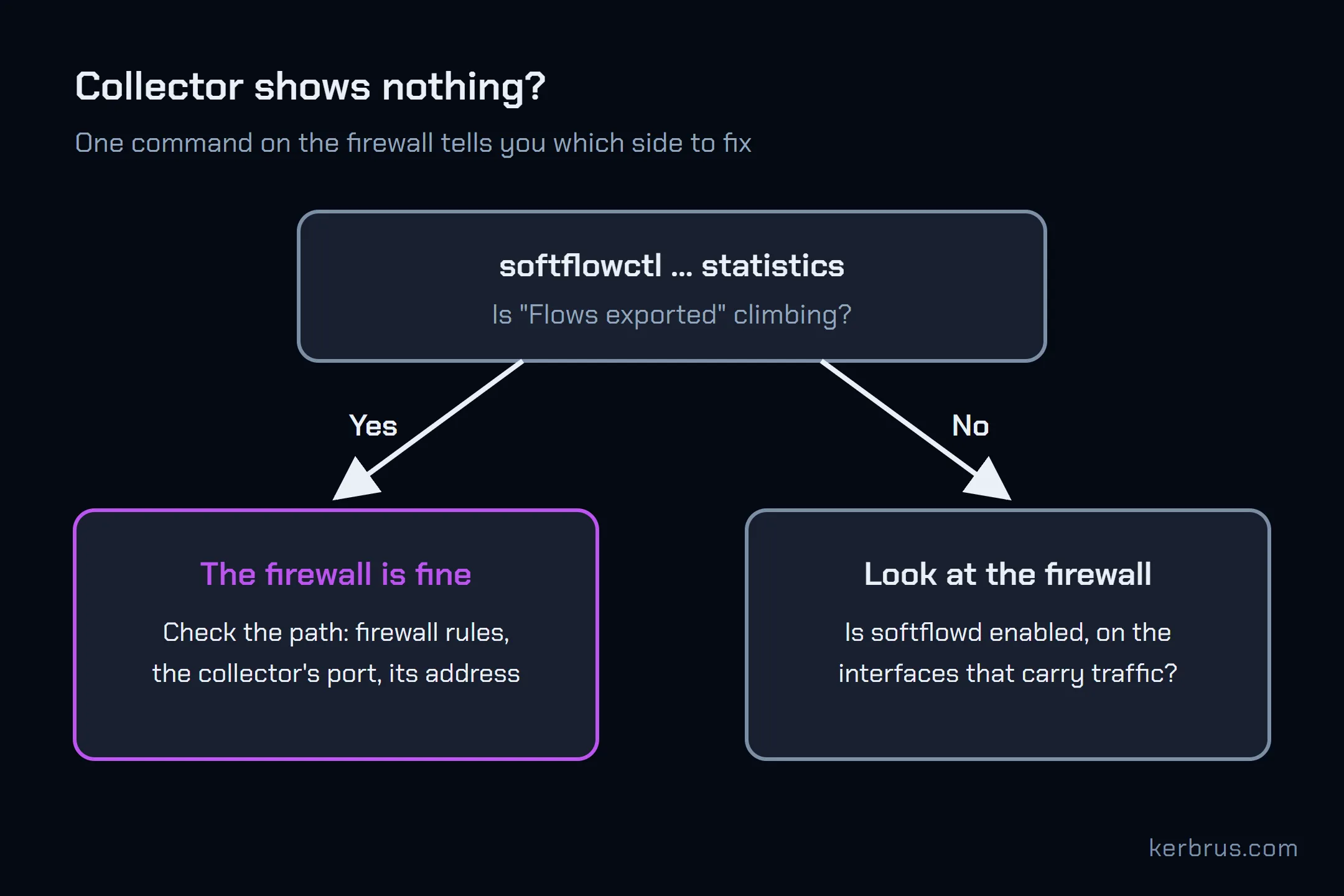
If the collector shows a small fraction of the interface counter, suspect the reverse counters. If it shows nothing at all, run softflowctl ... statistics first: if “Flows exported” is climbing, the firewall is doing its job, and the problem is between it and the collector. Why your NetFlow collector shows no flows walks that path one check at a time.
One more thing the post-room clerk gets wrong. softflowd writes the same interface into both the “input interface” and “output interface” fields of every record, so a collector cannot use them to split traffic into in and out. Use source and destination addresses for direction instead. Flow Collector recognises this and does not draw a direction split for softflowd exporters.
What this does not cover
These numbers come from one small office network over 13 hours. A site that serves more than it downloads will see a different split between forward and reverse. A bigger WAN will fill 8,192 lines faster. We did not measure unidirectional mode; with bidirectional off, forward counters should carry everything, at twice the record count. And softflowd only sees traffic that crosses the interfaces you selected: two machines talking on the same LAN switch never pass the firewall.
Questions
Which NetFlow version should I choose in softflowd? Version 10 (IPFIX). It is the current standard, and it is the only version softflowd can send bidirectional flows in.
Why are my pfSense NetFlow totals lower than the traffic graph? Most often, bidirectional flows are on and the collector reads only the forward counters. On our WAN that showed 8.8% of the real traffic.
Do I need softflowd on pfSense Plus? No. pfSense Plus 24.03 and later has a built-in exporter. softflowd is the option on Community Edition.
Which port should softflowd send to? Whatever your collector listens on. 2055 is the usual convention; Flow Collector listens on 2055, 9995 and 4739 and accepts NetFlow v5, v9 and IPFIX on each.
Flow Collector is free up to 1,000 flows per second. Our firewall, both ports together, averages about 20. See pricing.
Once the flows arrive, the next question is where they go. Our guide to traffic by ASN and country uses this same firewall.
Five minutes to set up, one command to check it, and the factor of ten goes back where it came from.