
See NetFlow traffic by ASN and country
Your firewall knows every address your office talked to today. It has no idea who any of them belong to.
Ours sent about 1.7 million flow records in 24 hours, and every one of them had a zero where the network number should be. That is not a fault. A firewall like pfSense has nothing to fill that field with, so the name has to come from somewhere else. Once it does, the same records tell you that a quarter of the office’s traffic went to Amazon, and that one sixth of its internet traffic would be filed under the wrong country by a lookup that reads only where a network is registered.
So here is where those names come from, which country you are actually being shown, and which side of the firewall to read.
AS 0 means your router did not look it up
Every network on the internet has a number, its autonomous system number, or ASN. Amazon is AS16509. Netflix is AS2906. Flow records have two fields for it: one for the source address and one for the destination.
Think of each flow record as an envelope. The addresses are on the front. The ASN is the name of the company that owns the building.
A router only writes that name on the envelope if it runs BGP, the protocol networks use to tell each other which addresses they own. On a Cisco router you also have to ask for it: ip flow-export version 9 origin-as exports the network the address belongs to, and peer-as exports the neighbouring network the traffic passed through. Everything else sends a zero.
Which is most of the routers that small and mid-sized networks own. pfSense, OPNsense and most branch routers do not run BGP, so they write AS 0 on every envelope. We checked a thousand records from ours: a thousand zeros.
So the collector has to do the lookup itself:
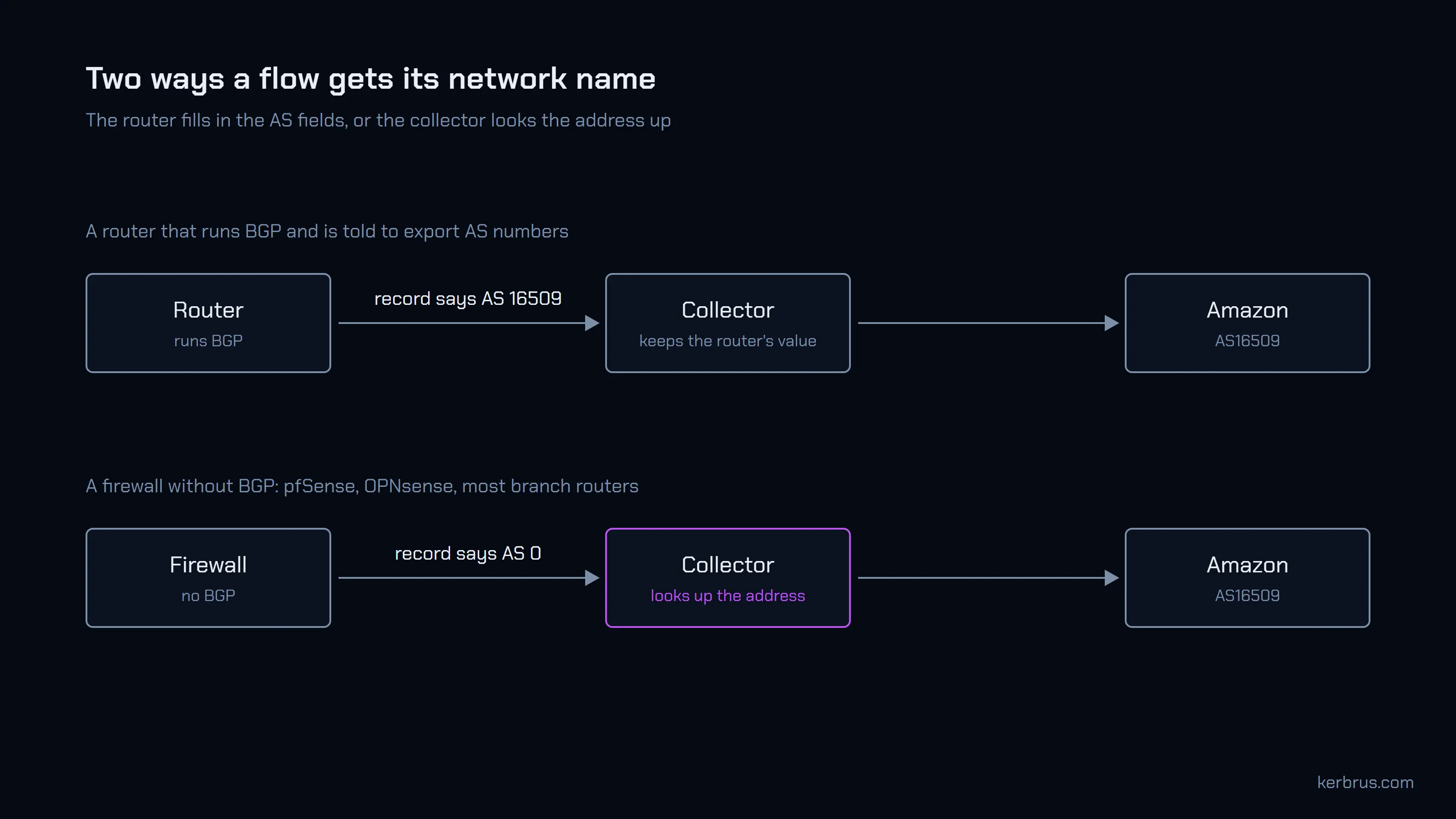
Flow Collector does both. If the record carries a real AS number, it keeps it. If the record says 0, it looks the address up.
A lookup is a phone book that has to stay current
The lookup is simple: a table of address ranges, each with the network that owns it. Public versions exist; iptoasn.com publishes one daily, free, with no account. Ranges change hands, though, so a table from last spring will slowly start naming the wrong owners.
Flow Collector checks for new data once a day and installs it on its own, with nothing to set up. It looks each address up once, when the flow arrives, and stores the answer with the record.
That has a cost worth knowing. A flow keeps the answer it got on the day it arrived. If a block of addresses moves from one company to another, last month’s flows still say the old owner. For a report about where traffic went, that is usually what you want. For a report about who owns an address today, look it up today.
Here is what the lookup made of one day on our pfSense:
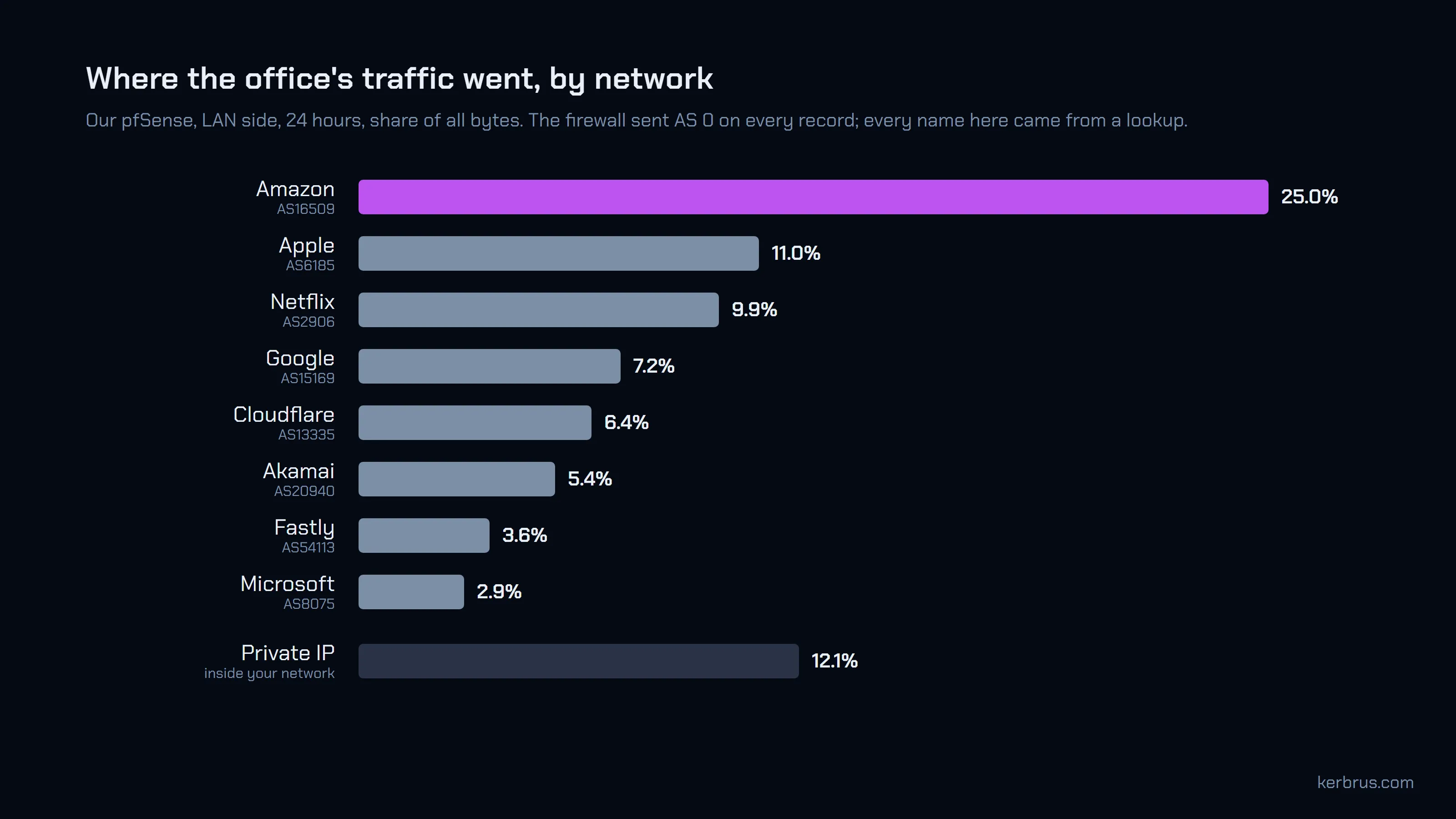
Eight companies carry most of a small office’s day. None of them appeared in the records the firewall sent.
“Country” has two answers
Country looks like the easy part. It is the one most likely to be wrong.
There are two ways to answer “which country is this address in?” One is to ask where the network that owns it is registered: the company’s head office. Most ASN tables include that, because the registry records it. The other is to ask where the address is used: which building the server is actually in. That needs a geolocation database, built by measuring where addresses actually are.
For a small company, both answers are the same. For the companies in the chart above, they often are not. A content network registers once and serves from hundreds of cities, and it serves you from whichever one is closest.
On our firewall, they disagreed for 17% of the traffic to public addresses:
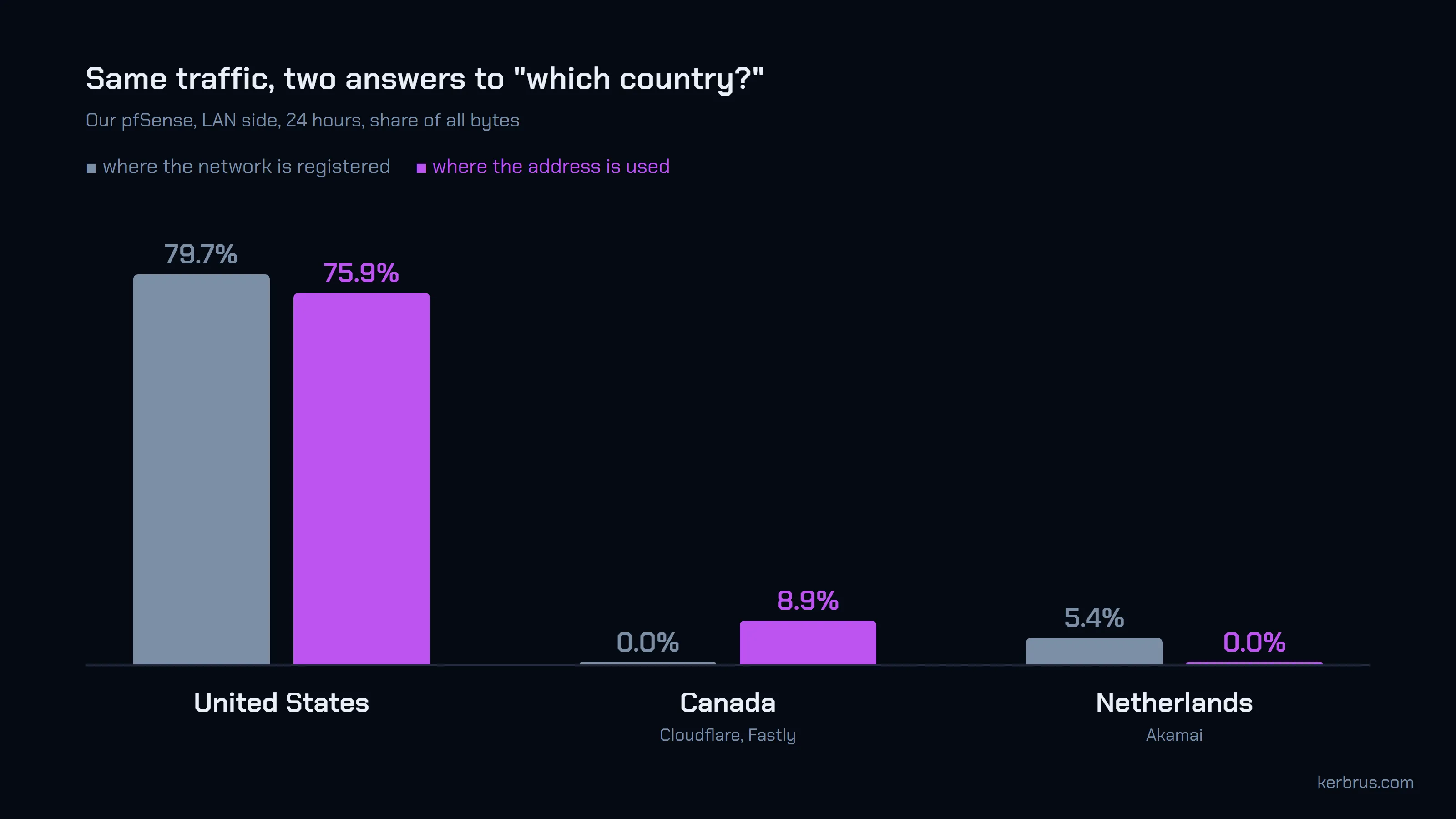
Cloudflare and Fastly are registered in the United States and served this office from Canada. Akamai’s network, AS20940, is registered in the Netherlands and served it from the United States. A registration-country report would show 5.4% of the office’s traffic going to the Netherlands. None of it did.
Flow Collector’s daily data includes geolocation, so its country reports show where the address is used. A tool that reads only an ASN table shows head offices. Before you trust a country chart, find out which one you are looking at.
Geolocation is still an estimate. It is good for the servers people connect to and weaker for routers in the middle of the path: one study of router addresses found the free databases right about the country 77-79% of the time. Read a country report as a good guide, not a sworn statement.
Read the LAN side, not the WAN side
Names and countries fixed, there is one more trap. It is in which interface you read.
pfSense exports each interface separately, and the two sides of the firewall see different envelopes. On the LAN side, the address on the envelope is the office machine and the real destination. On the WAN side, after NAT, the firewall has rewritten one address to its own public one. Every WAN record has your own address on it.
Which makes your own internet provider the biggest network you talk to:
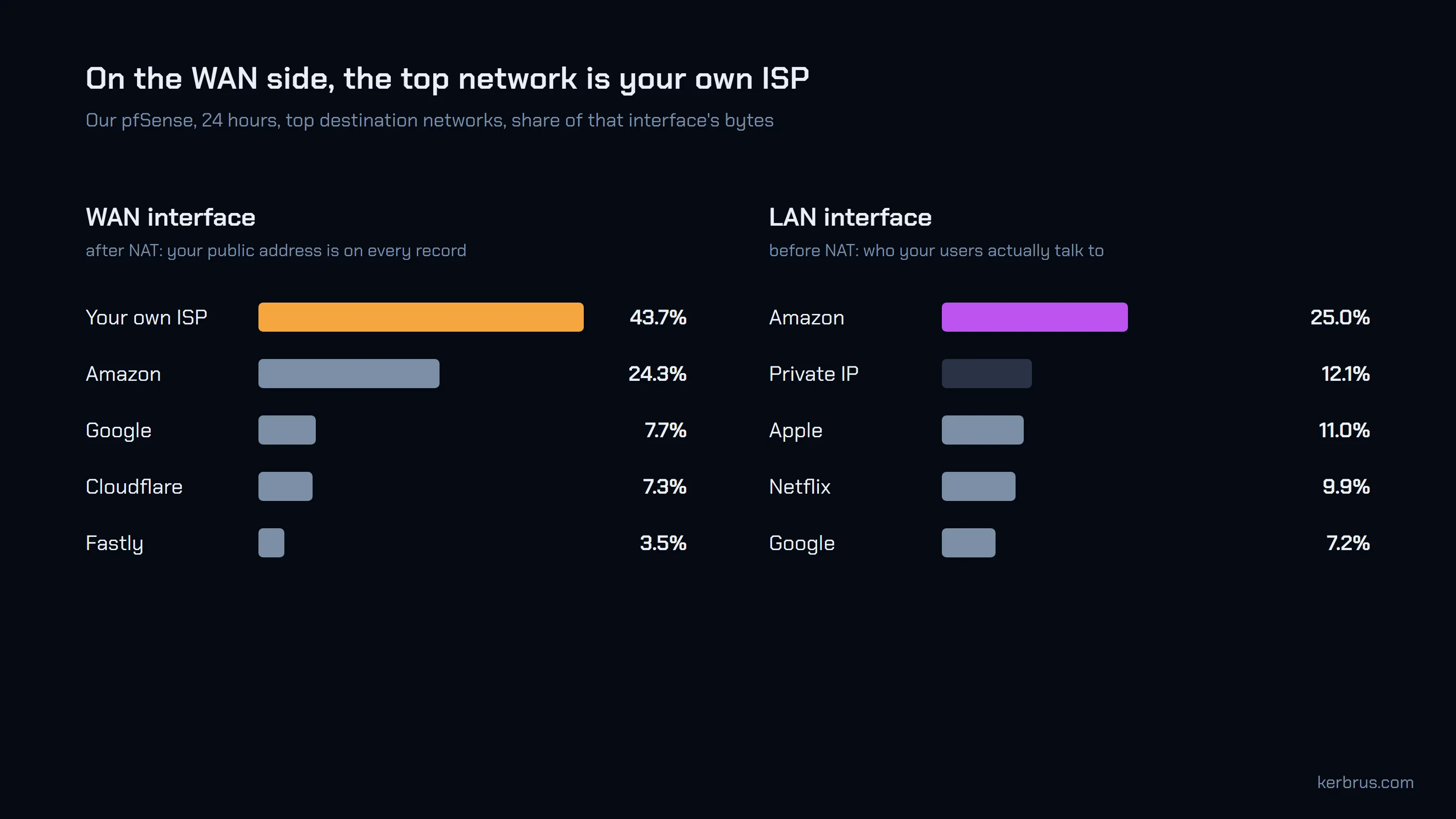
On ours, our own ISP was 43.7% of the WAN side’s destination traffic. It is not wrong, exactly. It just answers a question nobody asked.
For “who do our users talk to”, group by destination network on the LAN interface. In Flow Collector that is Explore, grouped by Dst AS Org or Dst Country, filtered to the LAN interface. If you only export the WAN side, filter out your own network instead.
Two labels will show up that are not companies.
Private IPis an address that only exists inside a network: 10.0.0.0/8, 172.16.0.0/12, 192.168.0.0/16, the 100.64.0.0/10 range carriers use for shared NAT, link-local addresses, and IPv6 fc00::/7. On our LAN side it was 12.1%: traffic that never left the building. A large share on a WAN interface usually means the exporter is seeing the inside of a NAT.unknownis a public address no table has an entry for. On ours it was 2.5%. If it grows, check that the daily data is still arriving: Administration → Feeds shows when it last did.
Check one row by hand
None of this needs to be taken on trust.
Pick the top network in your report. Open Flows, filter to that network, and copy one of its addresses. Put it into a public lookup such as bgp.tools. It will tell you who announces the address and where it is registered. If both match your report, the chart is telling the truth. If not, you have found out in a minute rather than in a meeting.
Questions
Why does my NetFlow show AS 0? Your router or firewall does not run BGP, or runs it without being told to export AS numbers. The collector has to look the address up instead.
Do I need BGP to see traffic by ASN? No. A collector that looks addresses up gives you the same network names from any exporter, including pfSense and OPNsense.
Is IP geolocation accurate enough for a country report? For where your traffic goes, mostly yes. It is weaker for router addresses in the middle of a path. Check that the report uses geolocation and not the registration country.
What does “Private IP” mean in a NetFlow report? The address is in a range reserved for use inside a network, so it has no owner or country to look up.
Your firewall still has no idea who any of those addresses belong to. Now something does.
If you want to see the names and countries on your own traffic, Flow Collector is free up to 1,000 flows per second. Our pfSense guide covers the export side.